> ## Documentation Index
> Fetch the complete documentation index at: https://docs.aisync.link/llms.txt
> Use this file to discover all available pages before exploring further.
# AI Calling Hours and Call Requests
> AI calls follow do-not-call and the lead's calling hours. How to call a lead right away when they ask for a call.
Your AI agents follow the same rules as the dialer:
* **Do not call always wins.** An AI agent never calls a lead on do-not-call, or a number on your Do Not Call list.
* **Calling hours follow the lead's time zone.** AI calls only go out during allowed hours where the lead lives.
* **Calls outside hours wait.** They aren't lost. They go out at the lead's next allowed time.
These rules apply to every AI call: workflows, AI campaigns, direct calls and calls your AI assistant starts.
## When a lead asks for a call
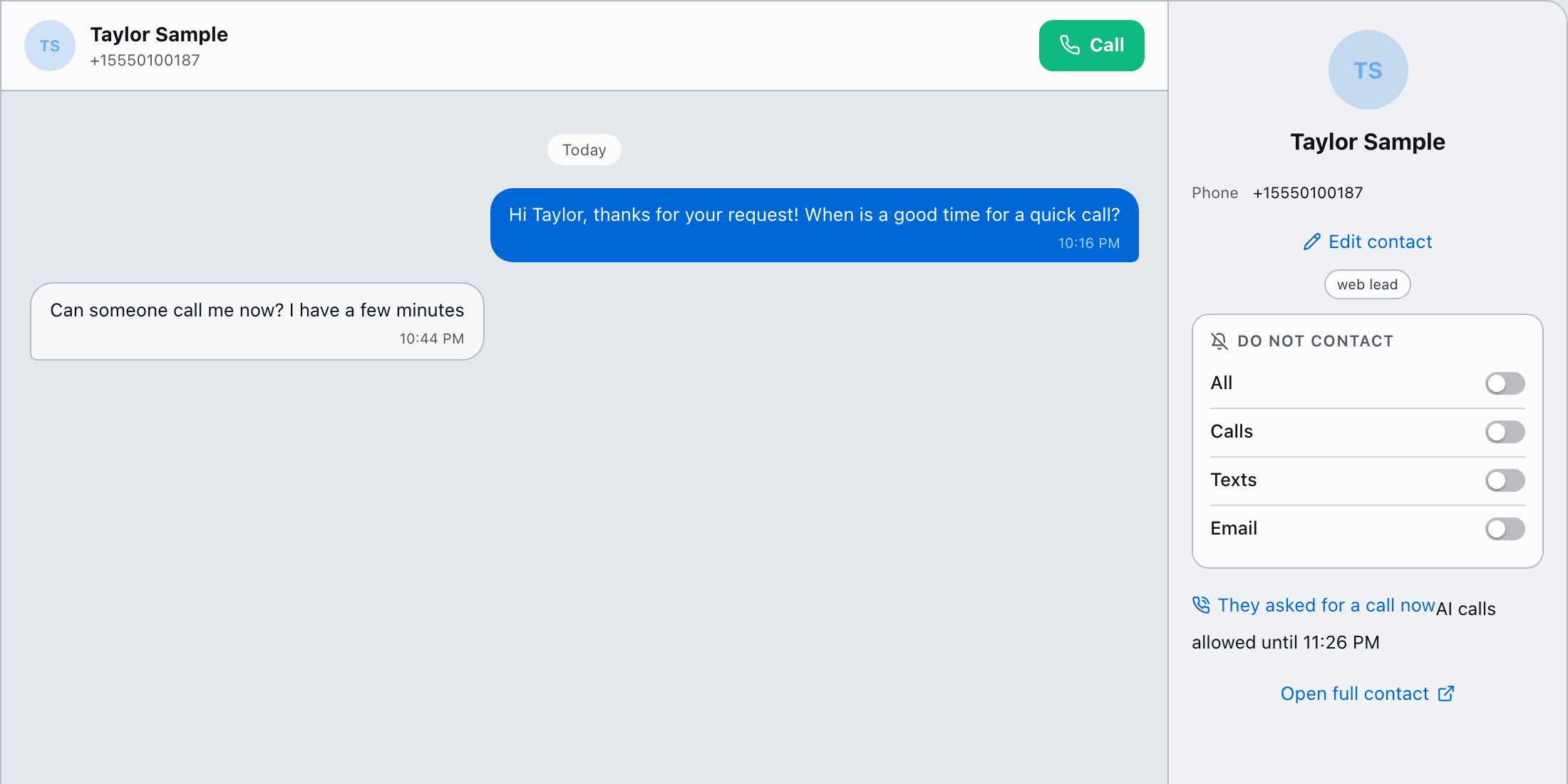
Some leads opt in late at night. If they reply that they want a call, the AI can call them right away, even outside calling hours. That's a **call request**.
1. **Ask first.** For example, text: *"We have 24/7 support. Is it okay if we call you now?"*
2. **Record their yes.** Use one of these:
* **In a workflow:** add the **Record call request** step after the text. It only records a clear yes. "No", "call me tomorrow" or "after 5" record nothing. You can branch on its result.
* **In the Inbox:** click **They asked for a call now** in the conversation. Their latest text is saved as proof.
3. **Start the AI call.** It goes out right away.
 ### What a call request allows
* **One call**, to that lead only.
* It lasts **2 hours** by default. An admin can set anything from 5 to 240 minutes.
* **Do not call still wins.** A lead on do-not-call is never called, even after a yes.
* The lead's exact words and the time are saved on their contact timeline.
Running opt-in campaigns after hours? Put **Record call request** right after your "okay to call?" text, then the AI call step. Leads who say yes get a call right away. Everyone else is called the next morning.
## How to tell why a call didn't go out
* **Workflow logs** show the reason, for example "Outside calling hours, next allowed 9:00 AM their time" or "On Do Not Call".
* **AI campaigns** show how many calls are waiting for calling hours and how many were blocked by do-not-call.
This documentation is built and hosted on [Mintlify](https://mintlify.com), a developer documentation platform.
### What a call request allows
* **One call**, to that lead only.
* It lasts **2 hours** by default. An admin can set anything from 5 to 240 minutes.
* **Do not call still wins.** A lead on do-not-call is never called, even after a yes.
* The lead's exact words and the time are saved on their contact timeline.
Running opt-in campaigns after hours? Put **Record call request** right after your "okay to call?" text, then the AI call step. Leads who say yes get a call right away. Everyone else is called the next morning.
## How to tell why a call didn't go out
* **Workflow logs** show the reason, for example "Outside calling hours, next allowed 9:00 AM their time" or "On Do Not Call".
* **AI campaigns** show how many calls are waiting for calling hours and how many were blocked by do-not-call.
This documentation is built and hosted on [Mintlify](https://mintlify.com), a developer documentation platform.